This article is part of an occasional series about what developers can do when they collaborate. AMD is a real believer in open source projects. Our developers actively contribute to and maintain a variety of open source projects, from highly optimized math libraries to… well, let’s talk about LibreOffice.
In case you haven’t heard about LibreOffice, it is an open source project that provides end users with a powerful suite of office productivity software: spreadsheet, word processor, and presentation software. You can learn all about LibreOffice here.
AMD engineers contribute to this project, for good reason. Think about what happens behind a spreadsheet calculation. There can be a huge amount of math. Writing software to take advantage of a Graphics Processing Unit (GPU) for general purpose computing is non-trivial. We know how to do it. AMD engineers wrote OpenCL kernels, and contributed them to the open source code base.
The goal was to accelerate the math behind spreadsheets in LibreOffice.
So, how much acceleration did we get? I’m glad you asked.
We took advantage of some nice test spreadsheets to measure performance. These have neat little macros built into them so you can see how long a calculation takes. Just click the button and go, and you see how many milliseconds the calculation takes. Pretty sweet and simple. As you can see in Figure 1, we used the Ground Water Daily test spreadsheet, which is based on a very large real-world data set of ground water levels in the Southeast United States, from the US Geological Service.

We used LIbreOffice 4.4.4. We ran it under Windows® 8.1, on an AMD A10 7800B APU. The computer had 8 GB of memory. We ran the same spreadsheet calculation with OpenCL on (acceleration via GPU Compute), so that the GPU cores did the heavy lifting. Then we turned OpenCL off, so that the CPU cores had to do all the work.
Here you go.

Well, this is a nice problem to have. I promise you, there is a tiny line next to GPU Compute. Look closely. Turning on the OpenCL option to enable GPU Compute resulted in a 500X+ speedup, about ¼ second vs. 2minutes, 21 seconds.
The time on any run will vary somewhat, based on what else is going on in the machine, so your mileage will vary here. For example, the first run will take longer because the OpenCL kernels must be compiled before execution. But you get the idea: AMD helped enable a huge speed improvement in a free, open source software package.
Win-Win-Win
AMD isn’t entirely altruistic. We win doing this. AMD processors get rated and reviewed based on performance. It is in our self-interest to make things work really, really fast on AMD hardware. However, there are a lot of ways to make that happen. Contributing to any particular open source project is clearly not a necessity.
There really is a belief around here that if we’re going to do something, we should raise the level for everyone. That’s why we commit to open industry standards and open source projects.
Another side of the win is end users, who get speed! The typical end user may have no idea what OpenCL is, or how it works. LibreOffice now defaults to having the OpenCL option on, so users don’t have to do anything for this to work. What they see is that a calculation that took minutes now happens in the literal blink of an eye. At a high level, what this means is that anyone who writes a spreadsheet formula is transparently able to, in effect, create optimized OpenCL kernels. THAT is way cool. There really is a belief around here that if we’re going to do something, we should raise the level for everyone.
The final win is for developers. The community working on LibreOffice got our help. You can read about the effort in a presentation by Michael Meeks at the 2014 IWOCL conference. Collabora also provide support and long term maintenance so that enterprises can confidently deploy an accelerated LibreOffice.
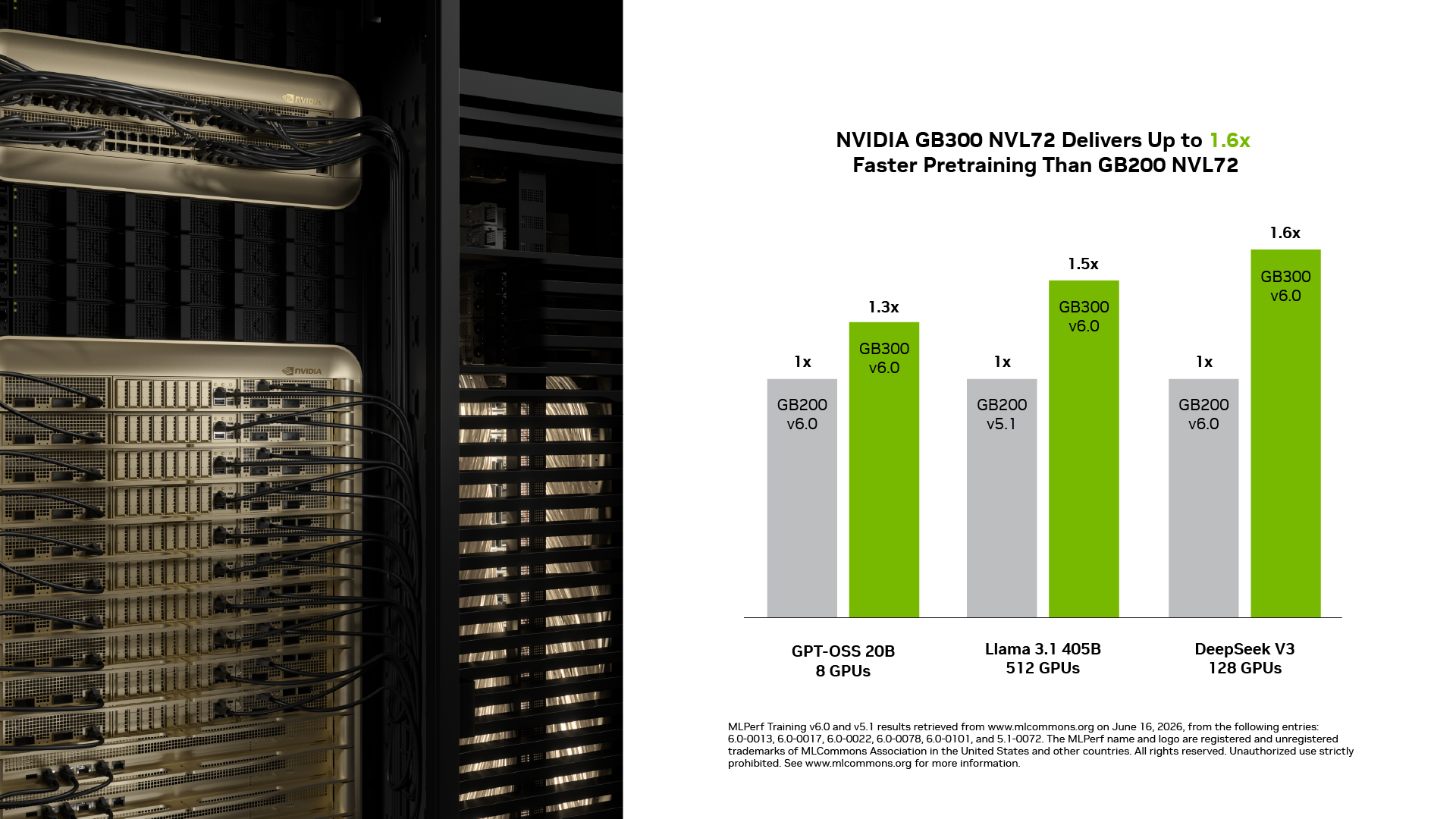
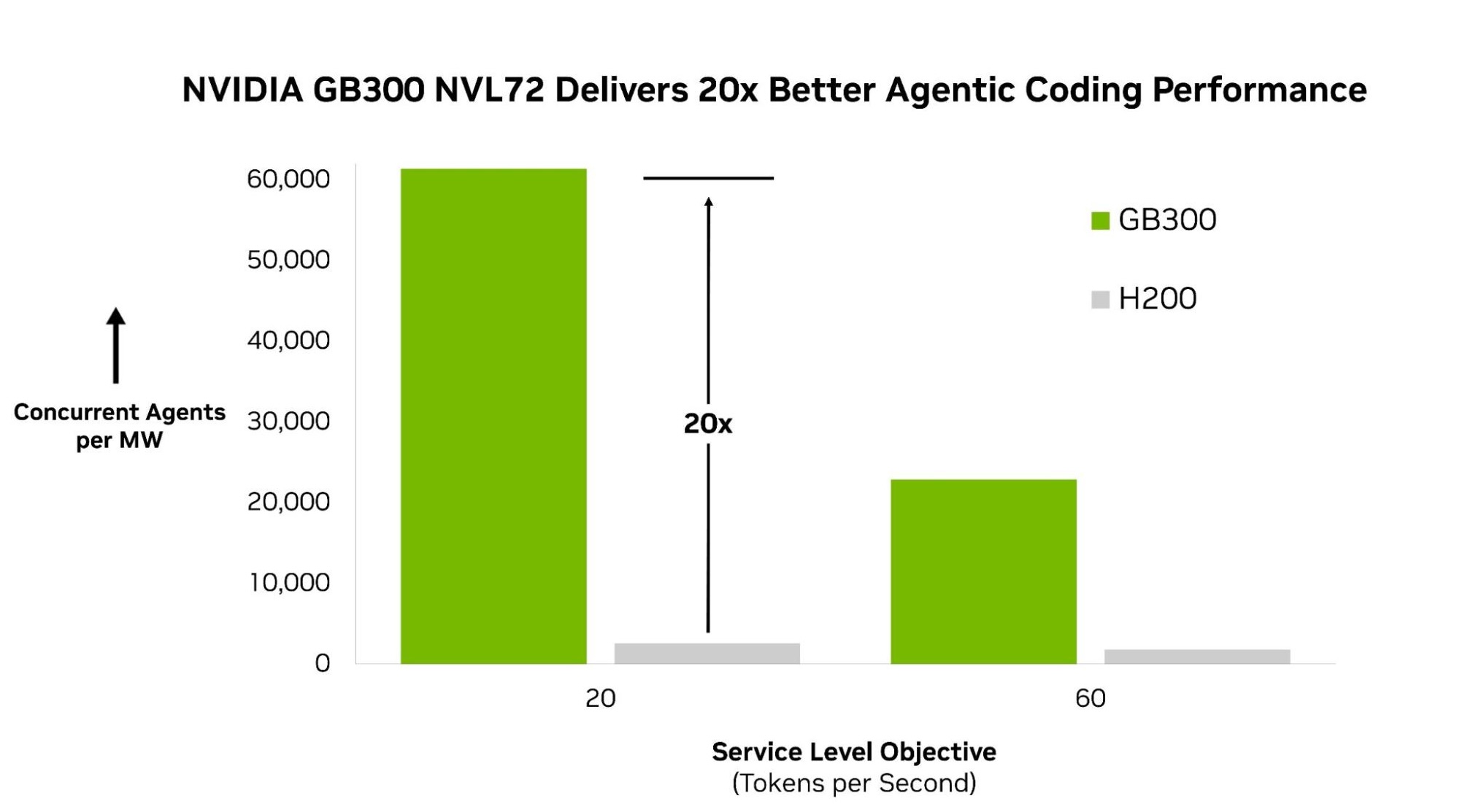
More generally, we build tools for you developers so you can accelerate code by taking advantage of the available GPUs. You can learn about and download the Accelerated Parallel Processing SDK at AMD’s Developer Central website. You can learn a lot at our blog series, OpenCL 2.0 Demystified. You can download the LibreOffice source code, and see what AMD developers did. That’s the beauty of open source. Our techniques are out there for other developers to see and to learn from.
And that’s a win for all of you. I’d say you can’t lose.
Jim Trudeau is Senior Manager for Developer Outreach at AMD. Links to third party sites and references to third party trademarks, are provided for convenience and illustrative purposes only. Unless explicitly stated, AMD is not responsible for the contents of such links, and no third party endorsement of AMD or any of its products is implied.
Windows is a registered trademarks of Microsoft Corporation. OpenCL is a trademark of Apple Inc. used by permission by Khronos.